Palettes
A palette is a curated collection of components. It helps users find relevant nodes quickly for a domain, project, or workflow.

An example of a palette with a focused set of components for a single workflow
Good palettes are focused. Smaller, purpose-built palettes are usually easier to use than one large catch-all palette.
There are two main ways to create palettes: automatic generation and manual authoring.
Creating Palettes Automatically from Source Code
Use the standalone palette generation tool to create component descriptions from source code. This is the fastest option when onboarding existing codebases.
Creating Palettes within EAGLE
You can build palettes directly in EAGLE.
Change UI Mode to
Componentin settings.Right click a component in the
Component TemplatesPalette or another existing palette.Select
Add to another paletteand enter a name under custom to create a new one.The Component can be edited under the new palette, or you can add more components to the palette by repeating the process.
You may also add components from the graph using right click menus with
Add Selected Node to Paletteor many with theAdd Graph Nodes to Palettein the navbar.
Manual palette generation is best for refinement and small curated palettes.
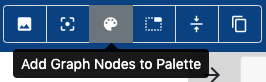
Click the “Add graph nodes to Palette” button in the navbar
Save palettes locally or to Git repositories. For collaboration, store them in a dedicated GitHub or GitLab repository.
The new palette containing a Docker component description